
Reviewing Print & Cut Layouts in Silhouette Studio
An independent visual guide to printed artwork, vector boundaries, repeated labels, and pre-cut review in Silhouette Studio.
A Review Environment, Not an Official Tutorial
Silhouette America presents Print & Cut as a feature of Silhouette Studio. This independent fieldbook focuses on reviewing the visible and cuttable space around artwork before production.
The review sheets isolate printed artwork, dashed cut contours, edge details, internal openings, and the expected final piece. They do not prescribe machine calibration or official cut settings.
Fieldbook Classification
- Category: Print/cut design
- Format: Review Sheets
- Brand role: Print & Cut environment
Dedicated Panel Routing
The primary Print & Cut interface centralizes optical mark toggles, thickness, and inset measurements away from legacy floating windows for unified prepress evaluation.
Relocated Cut Borders
Print and Cut border dimensions now reside under the Grid tab in Page Setup. Verifying active boundary outlines prevents clipping outer artwork edges during post-pass cuts.
4-Point Mark Calibration
The 4-point registration mark matrix on Cameo 5a reads corner indexes systematically, correcting sheet drift and media feed variations before the blade engages the substrate.
Vector Boundary Inspection Checklist
Execute this pre-flight verification sequence directly on the canvas to ensure vector cutlines align with printed pixels and remain clear of optical sensor reading zones.
Independent guidance: RegistrationMargin Notes analyzes visual review protocols for Silhouette Studio layouts. Always preview actual vectors in Send mode before executing passes on physical media.
Pre-Flight Step Verifier
Interactive boundary verification stagesBleed Contour & Inset Integrity
Confirm that outer artwork raster boundaries extend at least 1.5 mm beyond the vector cutline. This print bleed margin prevents unintended white paper fringes if physical sheet feed fluctuates marginally during cutting.
Hash-Mark Sensor Zone Clearance
Studio overlays hatched, cross-hatched, or grey shaded zones around each registration mark. Any text, artwork, or stray vector nodes falling inside these hashed fields will disrupt the optical sensor scanner.
Compound Paths & Cut Mode Assignment
Imported SVG or trace assets often embed interior nested shapes. In the Send panel, verify whether objects are designated as 'Cut' or 'Cut Edge' to prevent slicing internal artwork details.
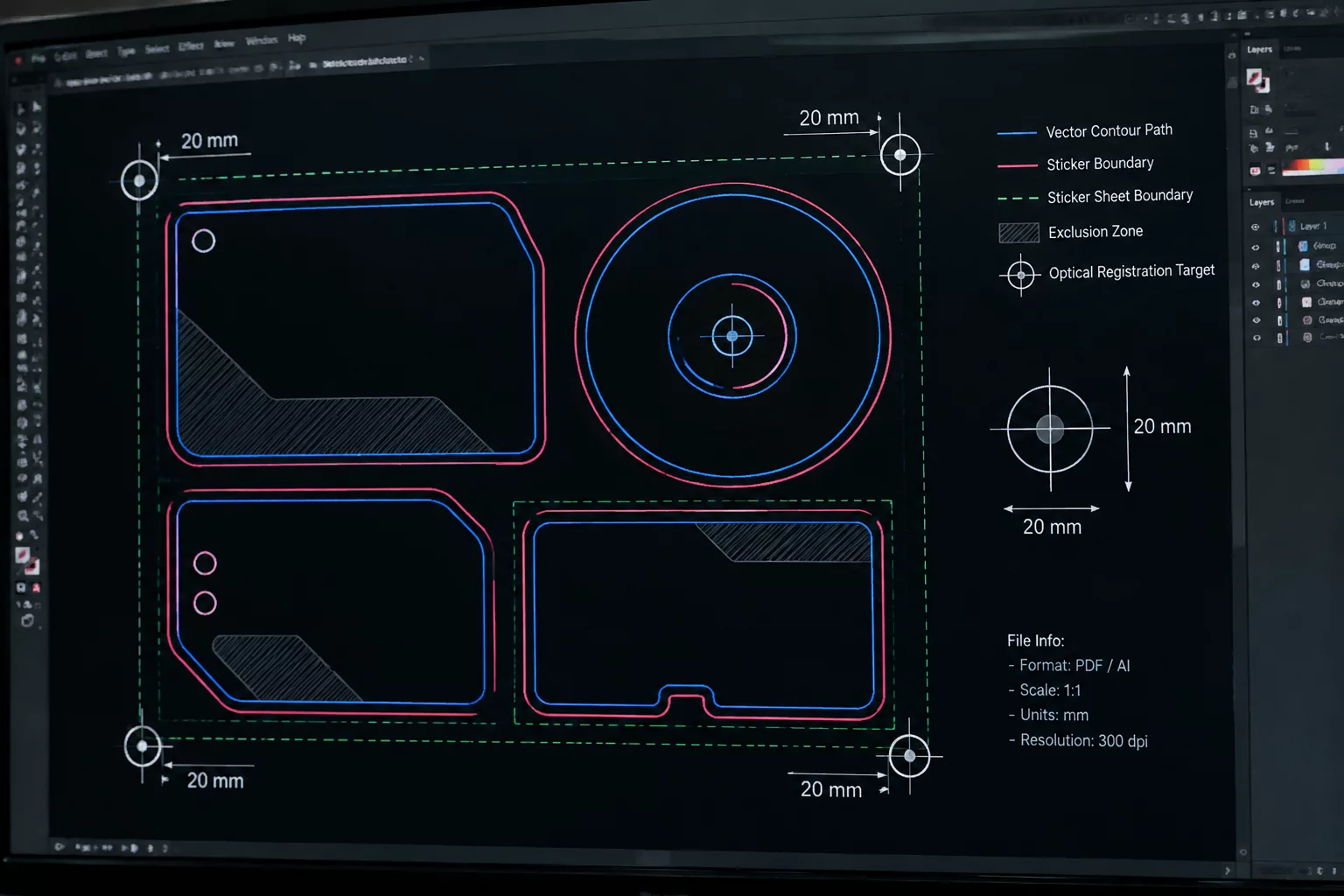
Boundary Geometry Mapping
Schematic visualization of registration targets, 20 mm mark bars, protective sensor exclusions, and the vector perimeter relative to substrate boundary limits.